Structured media libraries
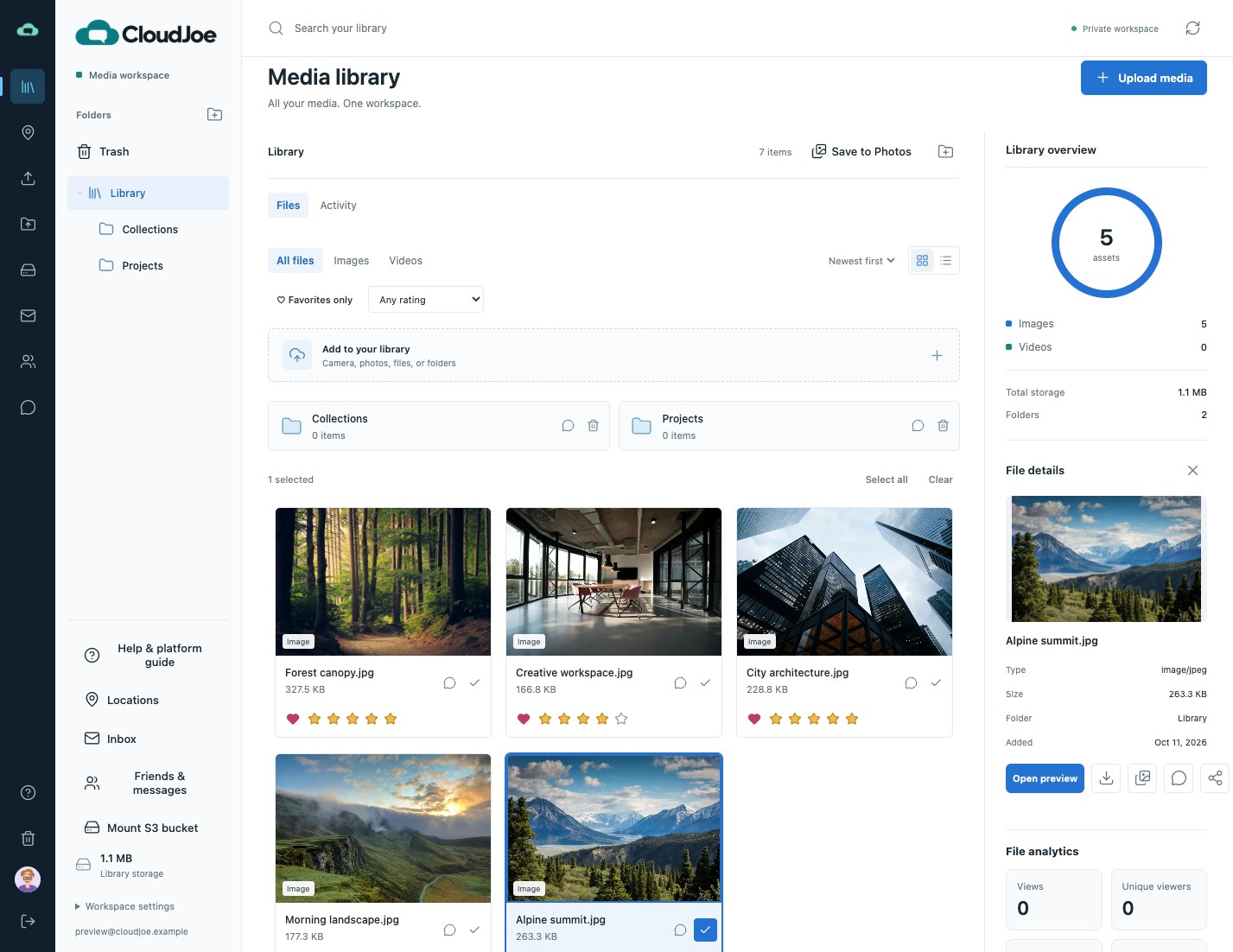
Add photos and videos from your phone, or upload files and folders. Browse a visual gallery or list and organize your media.
Invitation-only preview
Organize, share, and put your media to work. A private S3 workspace with API access for your tools, assistants, and external AI workflows. Use CloudJoe storage or connect your own bucket.
Invitation-only preview. Not publicly available yet. Existing users: sign in
The platform
CloudJoe stores media, conversations, workspace data, and activity on S3. Use CloudJoe-provided storage or connect your existing buckets, then work through the console or API.
Add photos and videos from your phone, or upload files and folders. Browse a visual gallery or list and organize your media.
Search filenames, filter media types, preview images and supported videos, and download originals.
Connect custom tools and external AI workflows to library browsing, media retrieval, and uploads through the API.
Create media posts, discuss files with comments and reactions, and connect through private messages.
Flexible S3 storage
Choose CloudJoe’s ready-to-use S3 storage or connect your own Amazon S3 or S3-compatible bucket. CloudJoe storage is available with your account and requires no storage configuration.
Two storage options. One CloudJoe workspace.
 Your private workspace
S3 storage for media, collaboration, and workspace data.
API access
Give your tools and AI assistants a way to work with your media. CloudJoe’s authenticated API connects library browsing, media retrieval, and uploads to the workflows you build.
/api/libraryAn example AI workflow
Your tool browses the library and retrieves selected media through the API.
Your external assistant or pipeline analyzes media or creates new images and videos.
Upload supported media outputs to CloudJoe for organization, sharing, and review.
Build with authenticated requests. Contact us to discuss API access and your integration.
On the roadmap
We’re planning more ways to discover your media and connect it to AI tools. Facial recognition, AI-powered tagging, and an MCP server are not available in the current preview.
Find the people behind the moments. Planned face grouping would help you discover photos of the same person across your library, without hunting through folders.
Find media by what’s in the frame. Planned tag suggestions would help surface scenes and objects across your photos, making large libraries easier to explore.
Bring your library into the AI tools you already use. A planned Model Context Protocol (MCP) server would give compatible assistants a standard way to discover and work with your CloudJoe media.
Today, connect your own AI workflows through the API. Built-in AI discovery and MCP connectivity are planned for a future release.
Privacy & encryption
Your library belongs to your account. Choose who joins a conversation and when to share media, with access controls and encryption protecting your connections.
Keep libraries private and conversations limited to their participants. Create or revoke media share links when you choose.
HTTPS protects data in transit. Connected bucket credentials are encrypted with AES-256-GCM and kept out of the browser.
Use CloudJoe-provided S3 storage or connect an existing bucket with your provider, access permissions, and encryption settings.
Encryption at rest for media depends on your storage provider and bucket settings.
Live chat & collaboration
Keep feedback connected to files with comments and live chat. Share selected media through secure links, and use private messages for ongoing communication.
Keep feedback and live conversations alongside your files, with saved history for the next time you need it.
Bring the right people into a file or folder discussion. You decide who joins and can remove access.
Connect by accepted friend request. Chat live or compose a subject-based message with threaded replies, unread updates, and saved drafts.
Create unique links to individual files or folders. Recipients can view and download the selected content without access to the rest of your library. Revoke each link independently to stop future access.
Choose the people who can join your conversations. Keep your library private and share media when you decide.
How access worksEmail-style inbox
Keep conversations alongside the files you work with. Familiar inbox workflows, with signed-in access limited to the participating CloudJoe accounts.
Private in-app messages between accepted CloudJoe contacts.
An example CloudJoe inbox
Let’s confirm the folder structure before we begin.
Getting started
CloudJoe is currently invitation-only. Approved accounts include S3 storage with no storage configuration required. Sign in to organize media, collaborate, and connect your workflows.
Request an invitationTell us about your media and workflows. Account registration is limited to invited email addresses.
Use the S3 storage provided with your account to upload media and collaborate, or connect an existing bucket.
Explore the API, organize your library, and collaborate with the people you choose.
Services & support
For business storage, media workflows, or a more involved migration, talk with CloudJoe about a solution that fits your requirements.
S3 storage for your workspace, provided by CloudJoe or connected through your existing buckets.
Organize and preview business media, with controlled conversations around files and folders.
Practical guidance for architecture, data migration, integrations, and custom software.
Frequently asked questions
A few things to know before requesting an invitation.
Talk to our teamCloudJoe is invitation-only and not publicly available yet. Request an invitation to discuss access. Existing users can sign in to their accounts.
No. CloudJoe provides configured S3 storage with your account. Media, conversations, workspace data, and activity are stored on S3.
Yes. Connect your own Amazon S3 or S3-compatible bucket for media storage, or use the storage provided by CloudJoe.
Yes. Your tools can use authenticated API requests to browse your library, retrieve media, and upload supported photo and video outputs. AI processing happens in the external tools you connect. Tell us about your workflow when you request access.
Not yet. Facial recognition, AI-powered tagging, and an MCP server are on the roadmap and are not included in the current preview. You can use filename search, folders, media filters, and authenticated API access today.
Libraries are private to their accounts, conversations have controlled access, and connected bucket credentials are encrypted. HTTPS protects data in transit; media encryption at rest follows your bucket settings.
The console’s Help guide covers uploads, supported formats, bucket connections, and sharing permissions.
Request an invitation
Email us to request an invitation to the private preview. Share your storage requirements and the tools you would like to integrate through the API.
Private social collaboration
Stay connected.
Keep control.
Bring familiar social features into your workspace: media posts, comments, reactions, and private conversations. Choose who participates, control what you share, and review a detailed history of media access and changes.
Media posts and activity
Create photo and video posts with captions. Follow updates in your private library and folder activity feeds.
Conversations and reactions
Discuss files, respond to messages with reactions, and stay connected through direct messages and live chat.
Granular sharing controls
Invite participants to individual file or folder conversations and revoke access when needed. Manage media share links separately.
Detailed audit history
Review timestamped records of media access, downloads, and file changes, alongside saved conversation history.
An illustrative workspace activity view